Guide · Offline speech recognition
Offline speech-to-text: private dictation without the cloud
Everything about offline speech recognition: how it works, how it differs from cloud services, who needs it, and how to start with VoxSpica on Windows and Linux.
- recognition languages
- 33recognition languages
- bytes sent to the cloud
- 0bytes sent to the cloud
- offline after install
- 100%offline after install
- interface languages
- 9interface languages
What is offline speech-to-text?
Offline speech-to-text (also called on-device or local speech recognition) turns spoken words into written text directly on your own computer. The audio never leaves the machine: there is no upload, no round-trip to a server, and no third party that can store or listen to it.
Cloud dictation services — Google, Apple, Yandex, Microsoft, and most web-based transcription tools — work the opposite way. They stream your microphone or audio file to a data centre, run a very large model there, and send the text back. That model is bigger and often more accurate, but it also means your voice leaves your computer every time you speak.
In one sentence: Offline speech-to-text is speech recognition that runs entirely on your own hardware, so audio never has to be uploaded anywhere.
With offline recognition, the model is the program. Everything it needs is already on your disk, so it works with the network cable unplugged.
How it works under the hood
Most offline engines — including VOSK, which VoxSpica uses — are built on the same pipeline that has driven automatic speech recognition (ASR) for decades: a statistical acoustic model plus a language model, searched by a decoder. Nothing here is magic, and nothing here needs the cloud.
01
Audio capture
The microphone or an audio file is read as a stream of samples, usually 16 kHz mono PCM.
02
Feature extraction
Short windows of sound are turned into compact spectral features (MFCCs) that describe how the sound changes over time.
03
Acoustic model
A neural network maps those features to phonemes — the small units of sound a language is built from.
04
Language model and decoder
The decoder searches for the sequence of words that best fits both the sounds and the rules of the language.
05
Text output
The result is written to the screen as you speak, or to a file for a recording you supply.
Why go offline
Cloud dictation is convenient, but it is built on assumptions that do not always hold. Offline recognition removes them one by one.
Privacy by design
Your voice is biometric data. When recognition runs locally, there is no upload endpoint, no transcript sitting in a vendor account, and no data to leak. Confidential interviews, medical dictations and legal notes stay on your disk.
No subscription, no quota
Cloud dictation meters you by the minute. A local engine has no clock: dictate for ten minutes or ten hours, the cost is the same — zero.
Works without the internet
On a plane, in a basement office, in a hospital wing with no Wi-Fi, or in a country that throttles access — a local model keeps working.
Lower latency, no round-trip
There is no network hop between you and the recognizer, so text can appear almost as fast as you speak, and it never stalls when the connection does.
Compliance without paperwork
Sending audio to a third party is a data transfer that GDPR, HIPAA and similar rules may require you to disclose and protect. Keeping audio on the machine removes the transfer entirely.
No vendor lock-in
The engine (VOSK), the models and your history are files you control. If a service changes its price or shuts down, your setup is unaffected.
Offline vs cloud dictation, point by point
The same table you would make if you were choosing for a company: what each approach actually requires.
| Feature | Cloud dictation | VoxSpica (offline) |
|---|---|---|
| Internet connection | Required for every session | Not needed after install |
| Cost | Subscription or per-minute quota | Free |
| Where audio goes | Uploaded to a third-party server | Stays on your computer |
| Account | Required, usually linked to an identity | None |
| Data retention | Vendor-defined, often stored | Local SQLite file you can delete |
| Offline availability | Fails without a connection | Works with the cable unplugged |
| Latency | Depends on network and server load | On-device, no round-trip |
| Accuracy ceiling | Very high (huge models) | Good to very good, model-dependent |
The one honest trade-off: the largest cloud models can beat a small local model on hard audio. That is why VoxSpica offers a large model too — you choose the balance of speed, memory and accuracy.
VOSK model sizes: small and large
VOSK ships two model sizes per language, not three. There is no 'medium' — a table with small, medium and large is a common mistake, and you will not find it here. Every VoxSpica installer bundles a small model; the large model is a one-time download you can add later.
| Model | Download | RAM while running | Load time | Best for |
|---|---|---|---|---|
| Small | ≈40–50 MB | ≈0.3 GB | A few seconds | Notes, short phrases, older or low-RAM computers |
| Large | ≈1–2 GB | ≈3–4 GB | ≈30–90 seconds | Meetings, interviews, long recordings, best accuracy |
There is no medium model
VOSK publishes only small and large models. A 'medium' row is fiction — if a page lists three sizes, it is guessing. VoxSpica shows exactly which model is installed and which are available for your language.
Which languages have which model
In the VOSK registry, 22 of VoxSpica's 33 languages ship both small and large models, 7 have a small model only, and 4 have a large model only. VoxSpica lists this per language and never pretends a model exists when it does not.
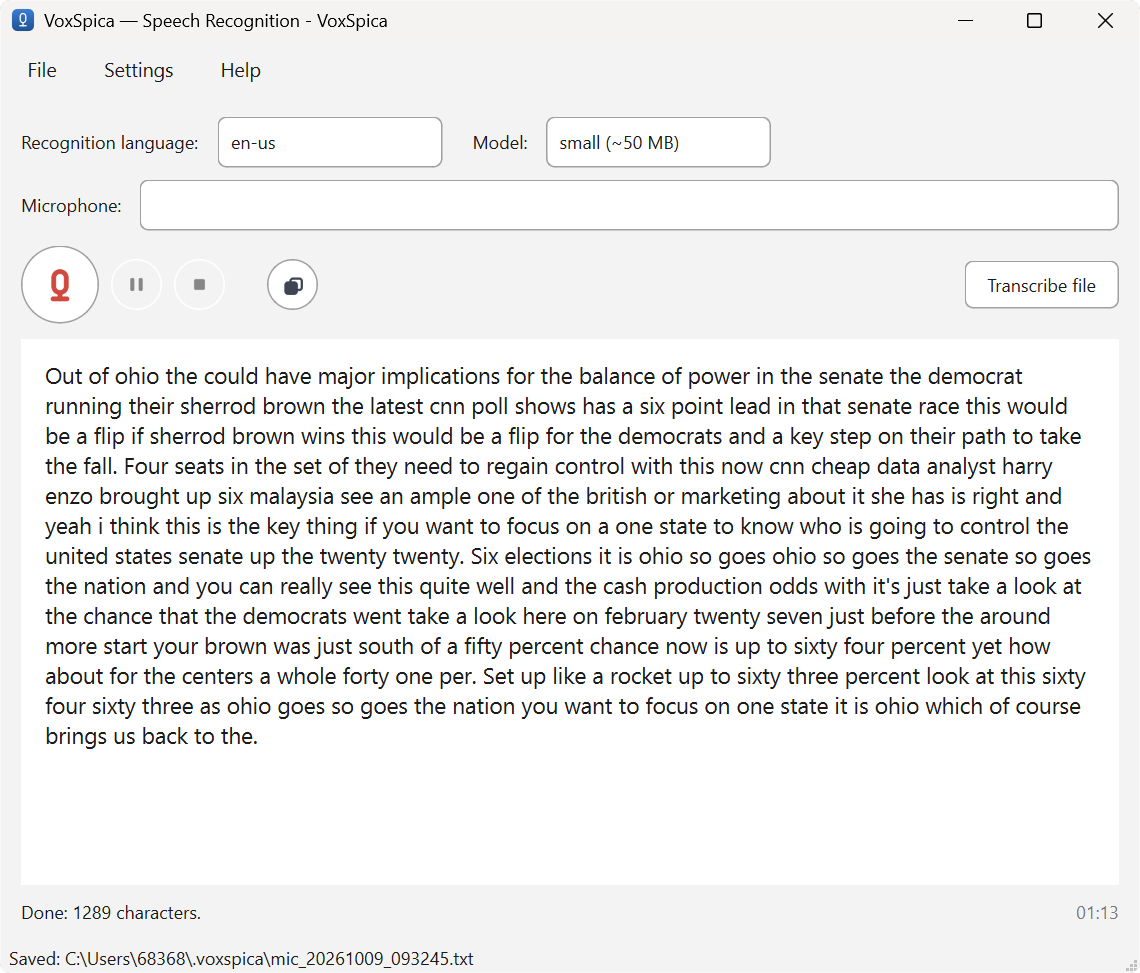
How VoxSpica works: from sound to text
VoxSpica is a thin, honest wrapper around the VOSK engine. It does not invent accuracy numbers or hide which model is running.
Install in your language
Each localized installer already contains a small recognition model for that language, so the first launch works offline with nothing to download.
Press record and speak
Pick the recognition language and model size. The model is loaded in the background while the window is already usable.
Watch the text appear
Text appears as you speak, with pause and resume and a stop that keeps the result. You can also hand it an audio file.
Find it again
Every session — date, language, model, device, duration and text — is written to a local SQLite history you can search in the app or from the command line.
Who needs offline dictation
If any of these sounds like your situation, a cloud-only tool is the wrong shape.
Journalists and researchers
Interviews and field notes are transcribed without uploading sources' voices anywhere.
Doctors, lawyers, therapists
Confidential dictation stays on the practice’s own machine, with no third-party data transfer to disclose.
Students
Lectures and seminars are captured locally, even in a lecture hall with no usable Wi-Fi.
Remote and low-bandwidth users
Works where a cloud service would spin or fail: rural areas, ships, aircraft, hospitals.
Privacy advocates
Your voice is yours. No account, no telemetry, no tracking, nothing to opt out of.
Offline and air-gapped setups
Machines that are deliberately kept off the network can still turn speech into text.
Install and start dictating
VoxSpica runs on Windows 10/11 and on Ubuntu 22.04/24.04 and Debian 12+ (x64).
Windows
Download the installer for your language and run it. The small model is already inside; the first launch works offline.
Download for WindowsLinux (.deb / APT)
A native .deb for Ubuntu and Debian, or add the APT repository and install with one command: sudo apt update && sudo apt install voxspica
Download for LinuxCommand line (CLI)
VoxSpica.exe mic, VoxSpica.exe file interview.wav, VoxSpica.exe history --search "meeting" — the CLI and the window share one settings file and one history.
Read the guideWindows builds are not code-signed yet, so SmartScreen may warn about an unknown publisher. Choose “More info → Run anyway”; SHA-256 checksums are on the release page.
How accurate is offline recognition?
Accuracy depends on three things: the language, the model size, and the audio. A large model on clean speech in a well-supported language can be very good; a small model on noisy phone audio will struggle. Anyone who gives you a single percentage for 'speech recognition' is averaging over conditions that do not match yours.
VoxSpica is honest about this: it shows which model is installed and lets you switch. If the small model is not enough for a hard recording, add the large model for that language and run it again.
What moves the needle
- Model size — large models are noticeably more accurate but need more RAM and a longer load.
- Audio quality — a close microphone beats a distant one; background noise is the biggest single factor.
- Language support — languages with more training data (English, Russian, German, French, Spanish) do better than low-resource ones.
- Speech style — clear, continuous speech transcribes better than heavy crosstalk or overlapping speakers.
Privacy and security, concretely
Privacy claims are cheap. These are the concrete facts about how VoxSpica handles your data.
No audio upload endpoint
The program contains no address to send your audio to. Recognition is a local process; there is nowhere for a recording to go.
No account, no telemetry
You never sign in, and the app does not phone home. There is no analytics SDK and no usage tracking.
Local, deletable history
Transcripts and the searchable history live in your user profile (history in a SQLite file). Delete the app and its folder, and nothing remains.
You can verify it
The engine is open source (VOSK), and you can watch the network activity of the app yourself. Unplug the network and it keeps transcribing.
Troubleshooting
The three things that account for most first-run questions.
- SmartScreen warns about an unknown publisher — click “More info” → “Run anyway”. Windows binaries are not code-signed yet.
- Sound is not recognized — check that the right recognition language is selected and that the microphone is not muted or disabled in the system settings.
- It feels slow — try the small model, close memory-hungry apps, or install the model on an SSD. Large models need several GB of free RAM.
33 recognition languages, all offline
VoxSpica recognizes 33 languages and dialects locally, from English, Russian, German, French, Spanish and Chinese to Arabic, Hindi, Japanese, Korean, Turkish and Vietnamese — with no network involved. The interface itself is available in nine languages, and recognition and interface can differ: dictate in one language while the app speaks another.
Frequently asked questions
Do I need the internet after installing VoxSpica?
No. The installer already contains a small model, so the program works fully offline from the first launch. The internet is used once, to download the installer (and, optionally, a large model).
Is there a limit on how long I can dictate?
No. There is no time limit and no quota. The only limits are your CPU speed and available RAM — a large model needs more memory and a longer load.
Can I transcribe an audio file instead of the microphone?
Yes. VoxSpica processes WAV directly and mp3/m4a/ogg when ffmpeg is available, exactly the same way as live speech.
Do I need a GPU?
No. Recognition runs on the CPU. A small model uses around 0.3 GB of RAM and starts in seconds; a large model needs a few GB and up to a minute or more to load.
Is there a 'medium' VOSK model?
No. VOSK publishes only small and large models. If a page shows a medium size, that row does not exist in reality — VoxSpica only offers models that actually exist for your language.
How accurate is it compared to cloud services?
The very largest cloud models can edge out a small local model on difficult audio, because they are far bigger. For clear speech, a large VOSK model is close and, unlike the cloud, costs nothing and sends nothing. VoxSpica tells you which model you are using.
Does it work in a VM, a container or an air-gapped machine?
Yes. Because recognition is local, a machine that never touches the network can still transcribe speech, as long as the model files are present.
What happens to my recordings and transcripts?
Nothing is written unless you ask. Transcripts are saved where you choose, and the searchable history is a local SQLite file in your user profile. Delete the app folder and the data is gone.
Can I use it from the command line?
Yes. VoxSpica.exe mic, VoxSpica.exe file meeting.mp3 and VoxSpica.exe history --search "meeting" work headlessly; the CLI and the window share one settings file, one history and one set of models.
Which systems are supported?
Windows 10 and 11 (64-bit) and Linux: Ubuntu 22.04/24.04 and Debian 12+, x64. There is no 32-bit build and no macOS build yet.
Dictate without giving your voice away
Free, offline and private on Windows and Linux. Pick your language, install, press record.